Draw the maze
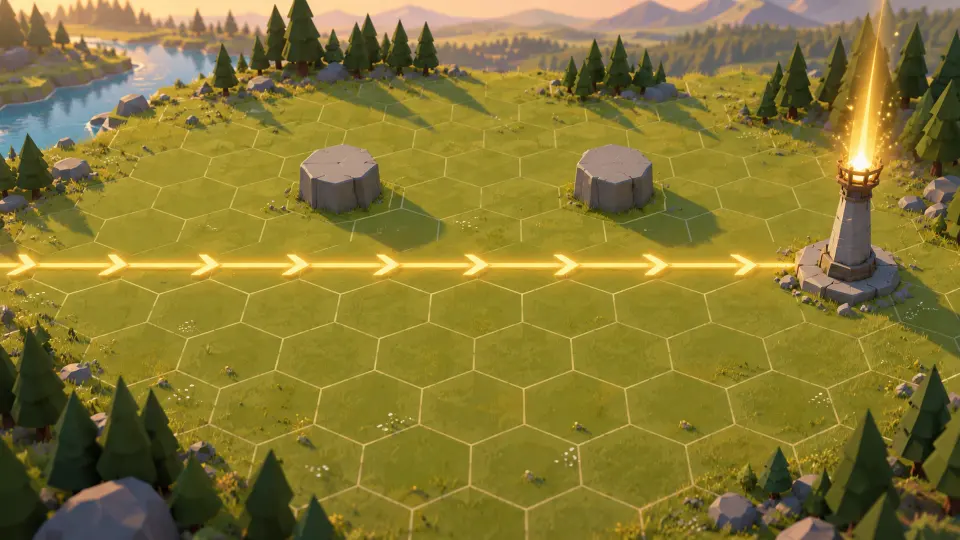
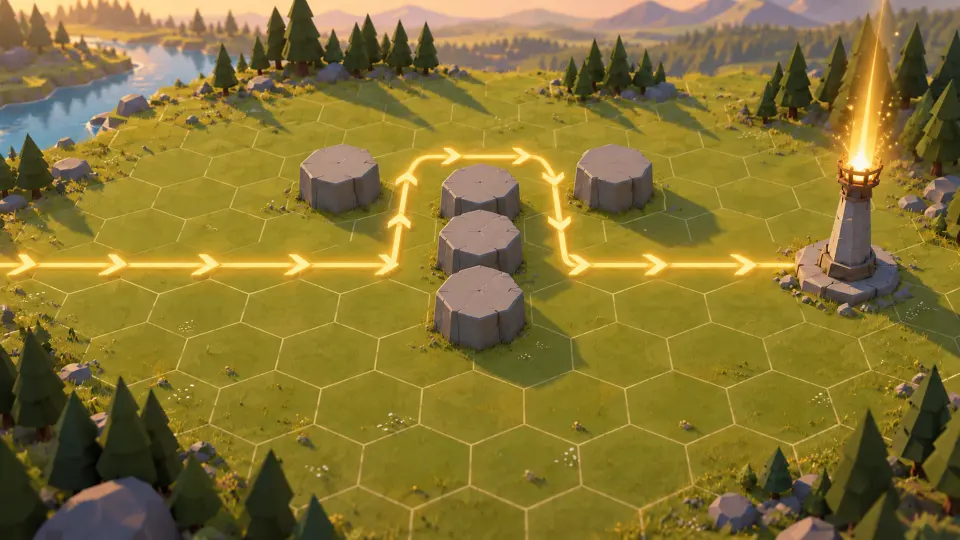
Raise stone walls on the hex meadow. The raiders follow a gold line to the beacon, and every wall makes their road longer. You can't seal it off: they always need one way through.
Early access: free and updated often
Raise walls to bend the raiders' road, rip parts off their clockwork machines, and bolt them onto your towers. Solo or with one friend.
Apple silicon (M1 or newer) · macOS 14 or later · 78 MB · version 0.11.1
A free invite beta for iPad (iPadOS 18 or later). There's a Mac version too.
Beaconfall is on Mac now, with an iPad beta. Send yourself the link for later.
Open the download, then drag Beaconfall into Applications.
Open Beaconfall from Applications. Your Mac asks if you're sure, because it came from the internet. Click Open.
The first launch spends about 20 seconds getting the graphics ready. Then press Play Solo.
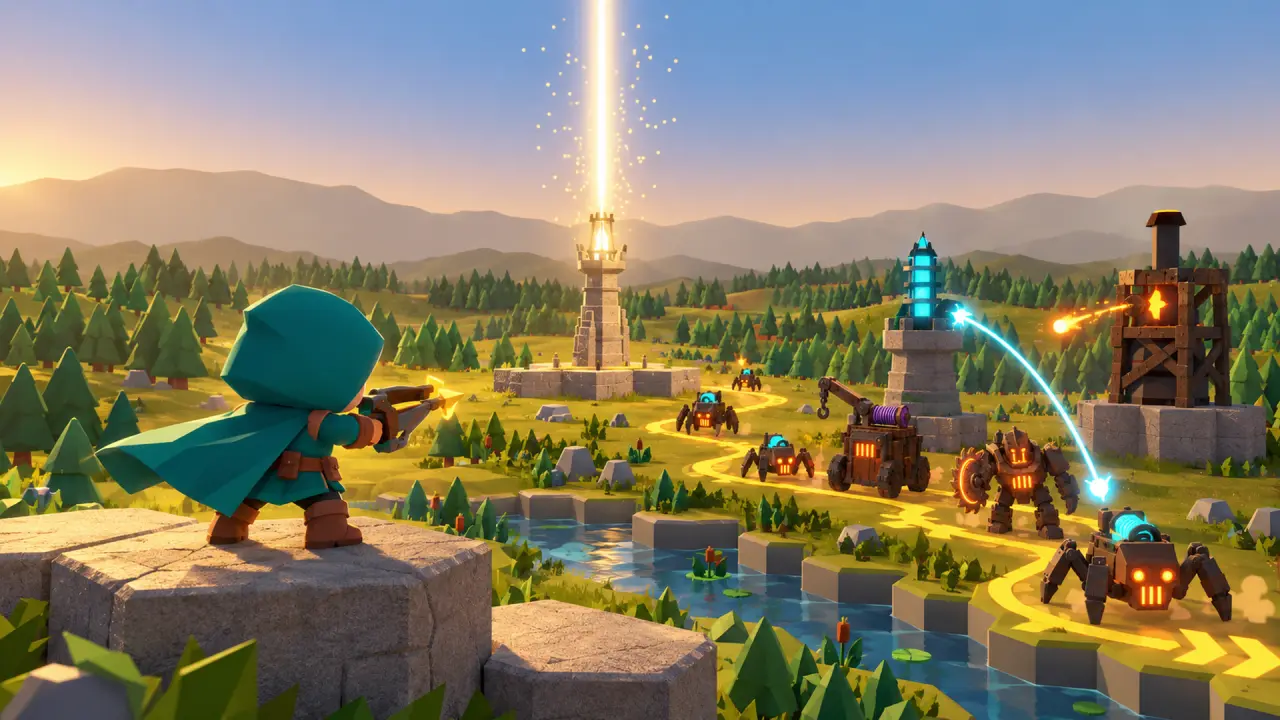
You're down on the field with a crossbow, not hovering above it. The Rust, an army of clockwork raiders, march on the last lit beacon in the valley. Here's how you stop them.
Raise stone walls on the hex meadow. The raiders follow a gold line to the beacon, and every wall makes their road longer. You can't seal it off: they always need one way through.
Wear a raider down, then hook a part off it before it breaks: a spark coil, a winch, a saw arm. Hooked parts go in your bag.
Bolt the parts you take onto towers you've built on your walls. There's no research menu: your best weapons come from the machines that came for the beacon.
Hold out to the end of the map and the beacon is lit again. Three maps open one after another, with harder challenges once you've won.
Beaconfall is for one or two players. There are three ways to play.
Keyboard and mouse, a game controller, or touch on iPad.
Split-screen for two on one Mac, each with a full view. Needs two game controllers, or the keyboard plus one controller.
On iPad, split-screen needs two game controllers.
A Mac and an iPad, two Macs, or two iPads, on the same Wi-Fi. Each of you plays on your own screen.
Both of you get the same version (right now that's 0.11.1). Mac: download it from this site. iPad: open TestFlight and tap Update if it offers one.
Join the same Wi-Fi. Not a guest network: those usually keep devices apart.
One of you hosts: Online Co-op → Host a game → pick a map. The screen shows a number next to “LAN”, like 192.168.1.23. Read it to your friend.
The other joins: Online Co-op → Join a game → type that number → Connect. If your device asks about the local network, tap Allow. If it then says “No answer”, tap Try again.
Both press Ready, then the host presses Start.
It works over Tailscale, a free app that puts your devices on one private network. Both of you install it and sign in to the same network, then join using the host's number that starts with 100. Playing over the internet without it isn't supported yet.
Same version? Both devices need 0.11.1. If the game says “Different game version”, update both: Mac from this page, iPad in TestFlight.
Same Wi-Fi? Not a guest network, and not one device on mobile data.
Is the host still on the Host screen? The host waits there until the friend connects.
Local network allowed? iPad: Settings → Privacy & Security → Local Network → Beaconfall on. Mac: System Settings → Privacy & Security → Local Network.
No in-app purchases and no data collected. Just the game.
Open the download, then drag Beaconfall into Applications.
Open Beaconfall from Applications. Your Mac asks if you're sure, because it came from the internet. Click Open.
The first launch spends about 20 seconds getting the graphics ready. Then press Play Solo.
Beaconfall_0.11.1_aarch64.dmg · 81,928,666 bytes
SHA-256: 0ad40256c559099d87cde3165eb4aa14f0d263f3b879971f2c47b90a86bf2664
For iPad with iPadOS 18 or later, through Apple's TestFlight app. It isn't in the App Store yet, and it doesn't run on iPhone.
Playing with someone who has it? Ask them for the invite link.
Beta builds last 90 days. When one runs out, open TestFlight to get the newer build.
Windows, iPhone and Android: not yet.
Big, readable type by default. In Settings you'll also find:
Yes. No account, no ads, no in-app purchases, and no data collected.
One or two. Two players can share one screen (split-screen) or play on two devices on the same Wi-Fi.
On Macs with Apple silicon (M1 or newer) running macOS 14 Sonoma or later. Intel Macs aren't supported.
Not yet. The iPad version is an invite beta for now.
Beaconfall is signed and notarised by Apple, which means Apple has checked it. Your Mac still asks the first time you open anything downloaded from the web. Click Open; it asks only once.
Check these: you both have the same version; you're on the same Wi-Fi (not a guest network); the host is still on the Host screen; and the game may use the local network.
On iPad: Settings → Privacy & Security → Local Network → Beaconfall on. On Mac: System Settings → Privacy & Security → Local Network.
Update both to 0.11.1: on Mac, download it again from this page; on iPad, open TestFlight → Beaconfall → Update.
Only with Tailscale for now: a free app that puts both devices on one private network. Without it, both devices need to be on the same Wi-Fi.
Yes, with two game controllers connected.
TestFlight builds last 90 days. Open TestFlight to install the newer build.
You may see “Aegis Beaconfall” in the Mac menu bar, in TestFlight and on the title screen. It's the same game.
Beaconfall is on the shelf there too, and it updates there.
On iPad, take a screenshot while playing and TestFlight offers to send it. On Mac, tell the friend who sent you here.